
 By
By 

You Better Be Aware Of The Sim Registration Order
There have been numerous complaints from customers who find out that their National Identification details have been used to register new numbers without their consent. The numbers are mostly used to commit crimes and this leads to impersonification.
The Communication Authority firmly holds that, under the Kenya Information and Communications Act, all Telco’s should be compliant in the subscriber registration process as the Authority requires all numbers to be linked to an ID which is now law.

Why Your SIM Card Will Be Disconnected
In regard to this, Safaricom has launched a service that will assist in fighting this kind of fraud and all customers are being urged to urgently visit a Safaricom shop, dealer, or agent with original ID to update their SIM registration.
One can also Dial *106# for lines registered to your ID which will also save you time.
Note that the person who has registered the line must update the line. E.g. Husbands who register lines on behalf of their wives.
Alternatively, they may transfer ownership when both individuals visit Safaricom shop with their original IDs.
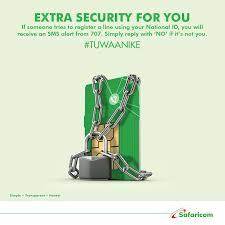
You Better Be Aware Of The Sim Registration Order.
If you want to check the numbers associated with your National ID, just:
- Dial *106#.
- Select 1: Check my numbers.
It will show you all the numbers registered with your details. And if there are numbers there that you cannot recognize, you can simply:
- Dial *106#or go back to the Home
- Select 2: Report unknown number
- Choose the number you do not know.
- Double-check and confirm the number for reporting
In case of an error and you accidentally report one of your valid numbers, you can return to the menu, cancel the reported number, and start the process afresh.
The process of updating sim registration takes less than two minutes



















Comments